The answer to all your questions is “yes”. And you can convert PDF file to more formats. But you need the helper-PDF to Word Converter. It was researched and developed by VeryDOC PDF who devoted itself to the software development.
With the help of PDF to Word Converter, you can reach all you aims about the PDF file converting. Let’s see the software itself. 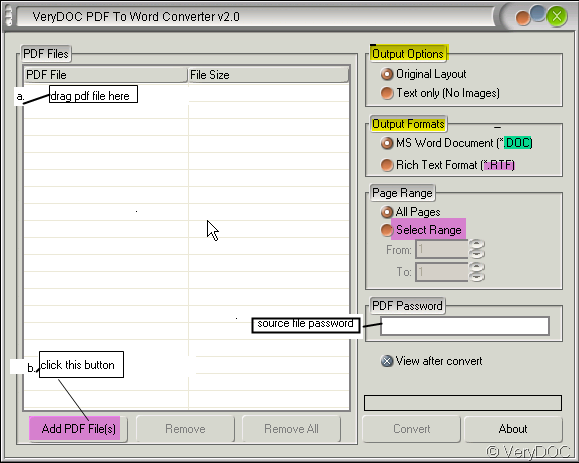
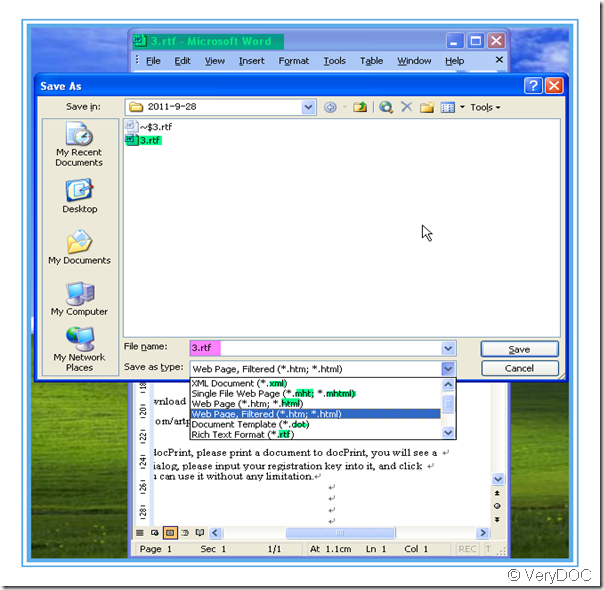
- “a,b” I marked in the picture are two ways of adding pdf file to the software. The menus in yellow color are about the output file content and format. Since our aim is to convert the pdf file to other form file, let’s see the second one carefully. It has two options: 1.MS Word Document (doc) 2.Rich Text Formats(RTF).Seeing here, i guess you have gotten one answer about “can I convert PDF file to RTF first?” After adding files and choose your options then you can convert them. A few seconds later, you can get a word document, it will bounce to your face and at the status of “ opening”. As you chose the (RTF) from, the word document is a RTF one. Seeing from the picture, we can know that you can change the 3.rtf to many forms. Then i guess you have gotten all your answers form this picture.
- This is the link of this software. https://www.verydoc.com/pdf-to-word.html You can have a try of it or you can buy it from this link. If you visit the website, you will find more function of PDF to Word Converter.
Random Posts
Related posts:
I want edit the PDF file in MS Word, please tell me the exact steps.
How do I convert a German PDF file to German Word document?
How can I reuse the PDF file in OpenOffice application?
Why we need PDF to Word Converter?
How do I convert a Simplified Chinese PDF file to Simplified Chinese Word document?
Do I need to launch MS word, Adobe Acrobat or Acrobat Reader first when I want to convert PDF files ...
Discount on Document Printer at VeryPDF.com during Christmas Rush
How to edit character space manually or automatically from PDF to Word