You can convert PDF into many pages or single page SWF files as you wish. With the help of VeryDOC PDF, it is as easy as reading ABC. With this one tool in hand, others can be saved.
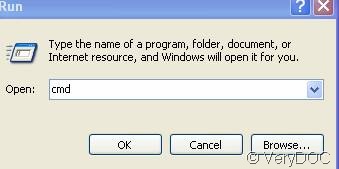
First click and input cmd as the screenshot shows
 . The following is inputting the formula
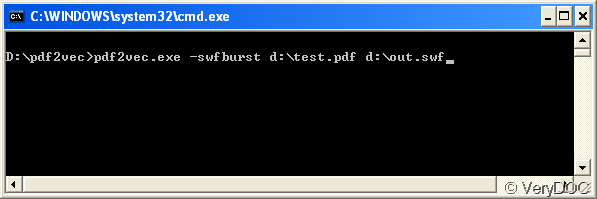 as this picture shows. The formula is made up of four units. ( a.
 b.-swfburst c.the PHD file you want to be burst d. your aim SWF files In this step,do not forget to change the file name to swf. Kindly reminder: Please hit SPACE BAR between each unit.
Related Posts
Related posts:
How can I convert EPS to SVG format from C# project?
Is your PDF to Vector product able to generate zlib compressed SWF file?
How to create transparent SWF file from PDF file?
Convert PDF to vector in batches
A way to convert Italian PDF to flash through command line
VeryDOC PDF to SVG Command Line Converter
How to convert PDF to PCL from PHP code?
How to convert PDF to Postscript and EPS from C#?