I am using a dxf file and the original drawing is about 74 ". I convert it and open the PDF up in PDF Reader and the drawing is about half the size. Any suggestions.
Customer
-----------------------------------------------
Please download "DWG to Vector Converter Command Line" from following web page to try, you can use "DWG to Vector Converter Command Line" to convert your DXF file to PDF file properly,
https://www.verydoc.com/dwg-to-vector.html
https://www.verydoc.com/verydoc_dwg2vector_cmd.zip
If you encounter any problem with "DWG to Vector Converter Command Line" software, please feel free to let us know.
VeryDOC
-----------------------------------------------
I am using this program. I want to open the dxf and convert to pdf and keep the measurements. I want to be able to print it out on the a cad printer. Life size. But when I use this program it changes the measurements of the dxf. That is why I sent you all three documents. The original the pdf created by this program and the jpg which will show you the size it is suppose to be. I need to print life size not 8.5 x 11 inch.
Customer
-----------------------------------------------
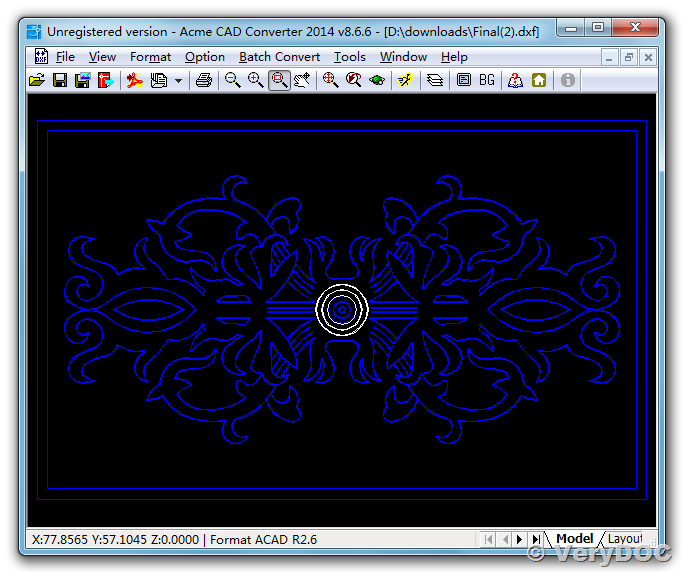
You can run following command line to convert your DXF file to PDF file with correct measurements,
dwg2vec.exe -fixed D:\downloads\Final.dxf D:\downloads\Final.pdf
Please look at a converted PDF file in attachment, this PDF file's paper size is 2.42x1.50 inch, it is same as your original DXF file.
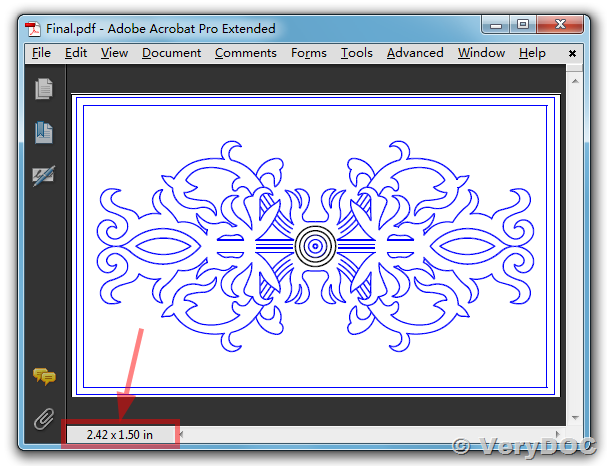
VeryDOC
See Also:
PDF to DWG Converter Command Line,
https://www.verydoc.com/pdf-to-dwg-dxf.html
Related Posts
- Purchase the software to convert from Office Word documents and AutoCAD DWG, DXF files to PDF files
- AutoCAD DWG and DXF to PDF Converter v2.2 failed to convert my DWG files to PDF files
- VeryDOC DWG to PDF Converter Command Line allows easily export DWG to PDF drawings and save the result to PDF, PSD, WMF, SVG, PNG, JPG, PSD and other raster images, vector images
- PDF to DWG/DXF Converter, DWG/DXF to PDF Converter, DWG/DXF to Image Converter, Scanned PDF to Vector DWG/DXF Converter
- Convert scanned PNG, JPEG, GIF or PDF format to vector CAD Drawings and Convert DXF back to original PNG, JPEG, GIF or PDF format
- VeryDOC DWG and DXF Series Products. Batch convert CAD, DXF, DWG, DWF files to PDF, TIFF, JPG, PS, EPS, etc. formats, and convert PDF files back to DXF and DWG files.
- How I convert AutoCAD 2012 to PDF without AutoCAD?
- Convert DWG to PDF form viewing DWG files in a browser
- DWG to PDF, Batch Converting
- How to monitor folders when converting DWG to PDF?
- PDF to DWG/DXF Converter, DWG/DXF to PDF Converter, DWG/DXF to Image Converter, Scanned PDF to Vector DWG/DXF Converter
- How to convert DWG file to PNG Image file and trim the margins from PNG image file?
- VeryDOC DWG to PDF Converter Command Line allows easily export DWG to PDF drawings and save the result to PDF, PSD, WMF, SVG, PNG, JPG, PSD and other raster images, vector images
- How to convert a DXF or DWG file to PDF file and maintain original measurements (paper size)?
- Purchase the software to convert from Office Word documents and AutoCAD DWG, DXF files to PDF files