To tackle this problem, i need explain one thing to you that after converting the PDF file, it has been altered to word document. If you know how to add header and footer in the MS word, it will be very easy to accept the way i will show to you.
Maybe we can review the way to add header and footer in the MS word. Illustrating is a good way to show it.
- Header and footer information different from one file to another. How to add it is depending on how many elements do you want to include in your files: such as,document title, chapter titles, page number, number of pages, date of creation, creator, date last saved, filename, or pathname. By knowing one method you will know all. So our aim is adding header and footer, others can be ignored.
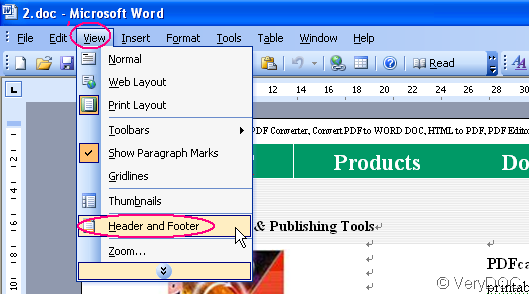
- Please View menu and select “Header and Footer”. The Header and Footer window opens and the body text fades to gray that means document can not be edited. The Header and Footer appear at the top and bottom of each page of the document.
- Please drag the mouse to the Header box at the top of any page and then in the Footer box at the bottom of any page. Please type the information you want be shown in the header and shooter. Then it will be shown on each page.
- Click the “#” button in the Header and Footer menu list to insert the current page number.
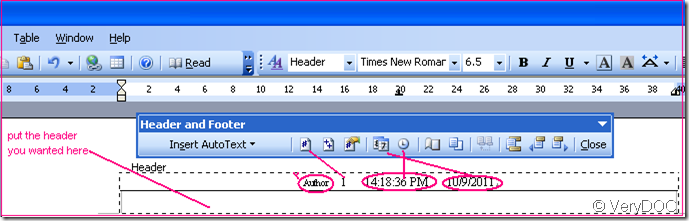
- It is not hard to find the “ Date and Time” .Just click buttons to Insert current date and time in the Header and Footer. Meanwhile we can inset the author, company.
- If you click “++ button”, it will add the whole number of the document. That means if this document has 6 pages, when you click “++ button”, it will show 6 in the header or shooter.
- It still have many other menus, you can add it in the header and shooter as you wish.
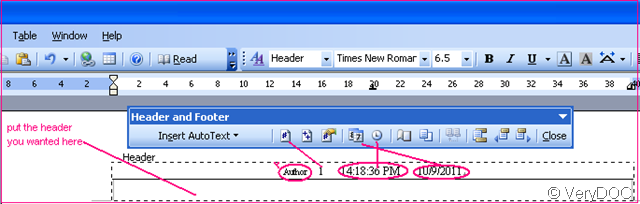
Then it will know how to add header and shooter in the converted pdf document. As with the help of VeryDOC PDF to Word Converter, once converted, it changes to word document. You can edit it like MS Word document.